HVAC Dispatch Software

Dispatch HVAC Techs Faster.
Route Smarter.
Close More Jobs.

ServiceBridge gives HVAC dispatchers a live GPS map, drag-and-drop scheduling board, and automatic customer ETAs — so you spend less time on hold and more time booking jobs.

  • Real-time GPS location for every tech on one map
  • Drag-and-drop scheduling board with instant job assignment
  • Automated customer confirmations & arrival alerts
  • Techs close work orders and collect payment from their phone

Book a Free HVAC Demo

Tell us about your business and we’ll show you the platform live — no commitment required.

Trusted & rated
★★★★★ 4.6 on G2
★★★★★ 4.7 on Capterra
★★★★★ 4.8 on TrustPilot
5,000+ field service companies
23%
More jobs per day
after switching to ServiceBridge
Faster payment collection
with mobile invoicing
18%
Reduction in fuel costs
from optimized routing
40%
Less time on admin
per dispatcher per week

What Bad HVAC Dispatch Costs You Every Day

Most HVAC companies lose $800–$2,400/month not from slow techs — but from the gap between the office and the field.

Constant Phone Tag
Dispatchers spend 2–3 hours per day calling techs for status updates, re-routing jobs, and relaying customer ETAs manually. Every call is a minute you're not booking new calls.
11 hrs/week lost
Paper & Whiteboard Scheduling
When the schedule lives on a whiteboard or in someone's head, one missed call cascades into a double-booked tech, a missed maintenance visit, and an angry customer — all before noon.
12% of jobs lost
No GPS Visibility
Without real-time location, you can't answer "Where is my tech?" — so you call them. They answer while driving. You waste both parties' time and expose yourself to liability every single day.
$340/truck/month
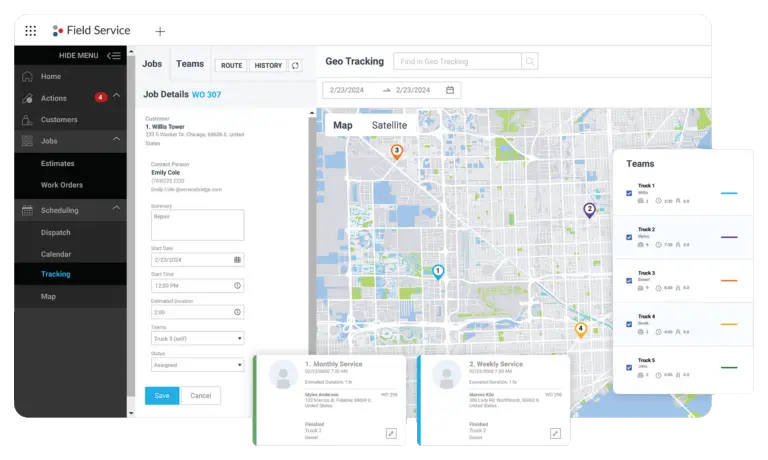
ServiceBridge live dispatch map showing HVAC technician locations

See Every Tech. Assign Every Job.
From One Screen.

ServiceBridge's dispatch board overlays real-time GPS positions on your job map. When a new call comes in, you can see which tech is closest, least loaded, and best equipped — and assign the job in two clicks.

  • Live GPS breadcrumbs — see exactly where every tech is right now
  • Color-coded status: en route / on-site / job complete / available
  • Drag-and-drop job reassignment without calling the field
  • Automated customer ETA texts sent the moment a tech is dispatched
  • Multi-day scheduling calendar with tech capacity view
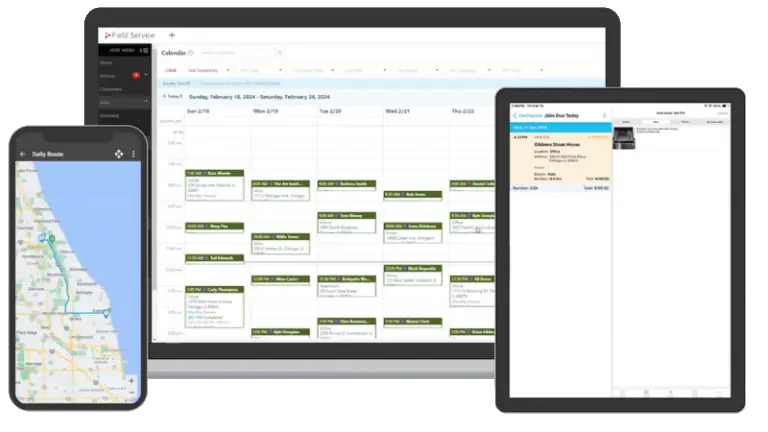
ServiceBridge mobile app for HVAC technicians — work orders, invoices, photos

Your Techs Close Jobs From Their Phone.

When a tech arrives, they have everything on their phone: customer history, equipment notes, warranty status, parts inventory, and the work order. When the job's done, they collect the signature and payment on-site. No paperwork. No callbacks to the office.

  • Full job details, customer notes, and equipment history offline-capable
  • Photo documentation — before, during, and after every job
  • Digital signatures captured on-site — no lost paper forms
  • Accept credit card, check, or ACH payment in the field
  • Automatic invoice sent to customer email the moment job closes
ServiceBridge digital work order management for HVAC companies

Every HVAC Job Documented.
Fully. Automatically.

ServiceBridge creates a complete digital record for every job — parts used, labor hours, equipment serial numbers, maintenance history, and customer sign-off. Your office staff can pull any job record in seconds. Your techs never lose a work order again.

  • Custom HVAC work order templates — heating, cooling, preventative, emergency
  • Automatic parts and labor line items from tech input
  • Equipment history tied to customer address — instant on repeat visits
  • QuickBooks sync: invoices post automatically, no double-entry
  • Recurring maintenance scheduling with automated reminders

Built for Every Type of HVAC Operation

Whether you run residential service calls, commercial maintenance contracts, or emergency HVAC repair, ServiceBridge adapts to your workflow.

Residential Service
Handle high-volume residential calls with automated booking, SMS confirmations, and tech routing that keeps customers happy and techs moving efficiently between stops.
Commercial Maintenance Contracts
Track equipment across multiple properties, set recurring maintenance schedules, and auto-generate work orders for quarterly and seasonal visits. Never miss a contract renewal.
Emergency & After-Hours Dispatch
When an emergency call comes in at 9 PM, see which on-call tech is closest, dispatch instantly, and send the customer an automatic ETA — all without a dispatcher on duty.
Preventative Maintenance Programs
Build out seasonal maintenance programs with automated outreach, pre-scheduled work orders, and digital checklists. Turn one-time customers into recurring revenue.
Parts & Inventory Management
Track which parts are on which truck. When a tech uses a part on a job, inventory deducts automatically. Get alerts before you run out of commonly needed HVAC components.
Fleet & Driver Management
HVAC vans are expensive. ServiceBridge tracks driver behavior, fuel consumption, and maintenance intervals so your fleet stays safe, efficient, and on the road longer.

HVAC Companies That Switched to ServiceBridge

★★★★★
"We went from 8 jobs per tech per day to 11 after getting ServiceBridge. The dispatch map alone was worth the switch — my guys aren't calling in anymore, I can just see where they are."
Mike D.
Owner, 14-tech HVAC company, Texas
Verified review on G2
★★★★★
"Our dispatchers used to spend half their morning on the phone just doing status updates. Now they spend that time booking new calls. We added $40,000 in revenue our first quarter with ServiceBridge."
Sarah K.
Operations Manager, HVAC & Plumbing, Georgia
Verified review on Capterra
★★★★★
"The mobile app changed everything. My techs used to call in for job details. Now they open the app, get everything, and I hear from them again when the job's done and paid. Paper is gone."
Carlos R.
HVAC Operations Director, Florida
Verified review on TrustPilot

HVAC Dispatch Software — Common Questions

What is HVAC dispatch software?
HVAC dispatch software is a digital tool that lets office staff assign jobs to technicians in real time, track their GPS location, send automated appointment confirmations to customers, and manage work orders from a single screen. It replaces phone-tag and paper-based scheduling — and typically pays for itself within the first month through recovered labor and faster job throughput.
How does ServiceBridge help HVAC dispatchers?
ServiceBridge gives HVAC dispatchers a color-coded scheduling board with live GPS overlays. You can drag and drop jobs onto tech calendars, auto-send customer ETAs, and see which techs are en route, on-site, or available — all without calling the field. Learn more about how our field service management software works.
Can HVAC technicians use ServiceBridge on their phone?
Yes. ServiceBridge has a native iOS and Android app for technicians. Techs receive job details, customer history, equipment notes, and parts lists on their phone. They can capture signatures, photos, and payment in the field — the work order closes automatically when payment is collected.
Does ServiceBridge integrate with QuickBooks for HVAC companies?
ServiceBridge integrates directly with QuickBooks Online and Desktop. Invoices, payments, and customer records sync automatically, eliminating double-entry between field operations and accounting. Most HVAC companies set it up in under an hour.
How much does HVAC dispatch software cost?
Pricing depends on the number of technicians and features needed. ServiceBridge offers a free live demo where a specialist walks through pricing options tailored to your HVAC company size. You can also use our ROI calculator to estimate what ServiceBridge would save your operation before you commit to anything.

Ready to Dispatch Your HVAC Team Smarter?

Free 20-minute live demo. A ServiceBridge specialist walks through your exact dispatch setup — no sales pitch, no commitment.